

If you’re like me, you absolutely love getting those weekly mission emails! It’s so fun to hear what your friends and family are doing all around the world, plus it’s always uplifting and inspiring!
Now that your own mission is coming up, you might be wondering: What’s the best way to set up my weekly emails?
Don’t worry — I’ve got you covered! In this post, I’ll walk you through exactly how to set everything up so you won’t have to manually type or copy hundreds of email addresses every week.
Let’s make this easy, so you can focus on sharing your experiences and testimonies! Ready? Let’s get started!
How to Set Up Your Weekly Mission Email List
Step 1: Create a contact group (label) in Google Contacts
After logging into your missionary account, head to Google Contacts.
Add everyone who has signed up to receive your weekly emails.
Check the box next to each person you want to include in your weekly updates (family, friends, old seminary teachers — whoever wants to hear from you!).
Next, click the Label icon at the top (it looks like a little tag). Click Create label, then give it a name you’ll remember — something like Mission Updates or Weekly Emails. Hit Save, and you’re good to go!
You can always add more people later if more friends want to be added to your list.
Step 2: Use Gmail to email your contact list
Now, open up Gmail and click Compose to start a new email.
In the BCC field (important for keeping everyone’s email private!), type the name of the label you just created. As you start typing, Gmail will suggest it — just click it, and it will automatically fill in all the email addresses in that group.
Leave the “To” field blank, write your weekly update, and hit Send!
And that’s it! Once this is all set up, you’ll be able to share your mission stories and experiences every week without worrying about copying and pasting a million email addresses.
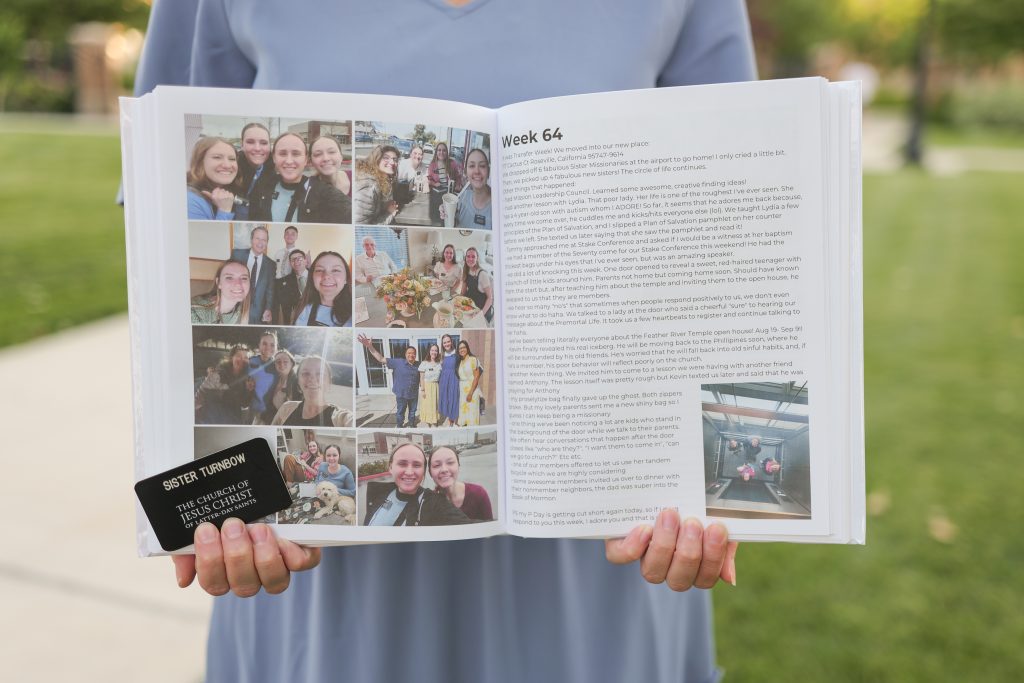
✨ Pro tip: Sign up for a Mission Book before you leave, so you don’t have to worry about saving your emails while you’re out! We’ll collect your weekly updates and turn them into a beautiful, hardbound book you’ll treasure forever.